Microsoft Store / Xbox App
Guide Written by Atony
This guide requires that you own Among Us on Microsoft Store / Xbox App.
Mod Installation
1. Download the latest Steam-Epic-MsStore.zip folder for Town of Us: Mira.
2. In the Xbox App Library, right-click Among Us and then click Manage.
3. Go to the Files tab and then click Browse...
4. Go to the
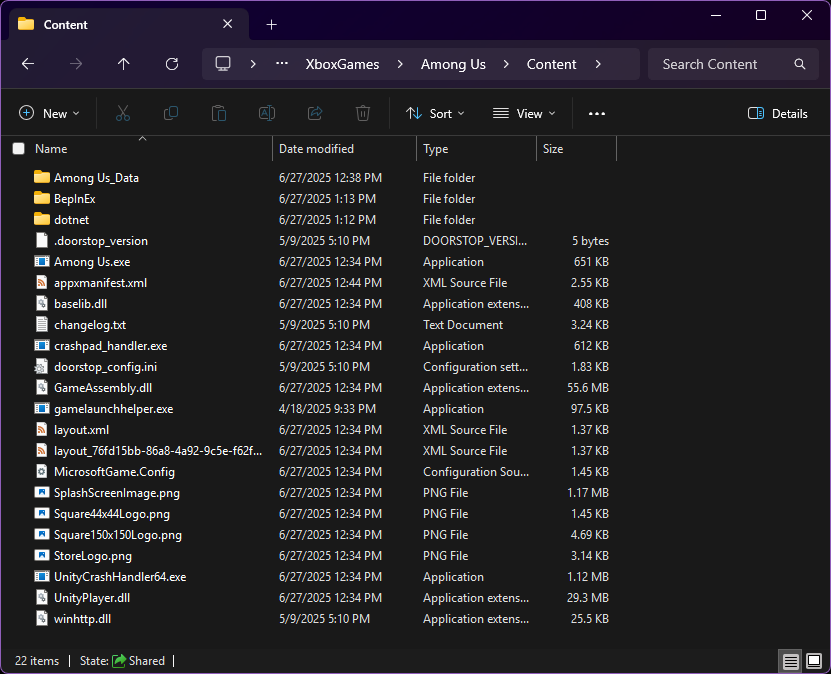
Contentfolder within Among Us.5. Extract the contents of the .zip folder you downloaded and copy the files. Paste them into your Content folder. It should look like this example:
6. If installed correctly, launching Among Us from the Xbox App should open the auto-updater, then Among Us with the Town of Us: Mira logo displayed in the top left corner.
If you encounter any issues installing, please join the Town of Us Discord server and open a Town of Us Support ticket in the TOU Support channel.